02/10/2007

seeing music, hearing pictures

i just have to post a link to this site. it's called the music animation machine and consists of videos of classical pieces being performed, with a piano-roll type animation showing the notes as they play, with different colours for separate voices and highlights for the current tone, almost like a strange karaoke machine. you can buy them on dvd or just watch some samples on youtube. apparently edward tufte is a big fan, and uses the system as an example in his lectures, to show how information can be easily assimilated if it is in the right format.


the best ones i have seen are Johann Sebastian Bach, Toccata and Fugue in D Minor, Frederic Chopin, Etude, opus 10 #7 and Franz Liszt, Feux Follets. i think they look like some sort of bizarre 2D cellular automata evolving with the music

enjoy!

(see also the IBM glass engine, infinity edition - a java applet for exploring philip glass's musical works.)

bandwidth gadgets

ok, i better post something since otherwise it'd be a full year (well, in a fortnight it would...) between posts. and, of course, fifty weeks is a perfectly reasonable gap instead.

the other reason for posting is that i finally got myself an interweb thing and my email and web-browser suddenly started working again! but no ADSL (no land line, rented property) or cable (not in my postcode, anyway) for me. instead, i now have a vodafone 3G data card in my laptop. it goes in the expresscard slot (although it does come with an adapter for PC card slots) so it looks nice and tidy, as opposed to the alternative white brick on the end of a USB cable i was offered. it does cost GBP 50.00 for the internal card, and the USB dongle is free, but there's no competition when you see them, and what else am i going to put in that slot anyway?

i also grabbed a new mobile phone, too - the sony ericsson W880i walkman phone. beautiful shiny steel case, really thin, candy-bar phone, plus it's 3G. the walkman features are pretty cool, and since it came with a 1Gb M2 data card and proper sony in-ear headphones (i.e. the ones with changeable rubber seals that stop noise escaping and irritating other people...) i might even start using it instead of my ipod. to complete my sony collection, i'm just holding out for the MBW-150 bluetooth watch, supposedly shipping in october...

it's still the 3g data card that amazes me, though. i remember my first GSM modem card (in an apple newton, actually, connected to a motorola star-tac) which gave me 19.2Kbps with compression, if i was lucky. this card gives me 7.2Mbps (peak, confirmed) or 1.4 Mega-bytes per second. boggle.

09/10/2006

the tesco value experiment

although i've been paid now, i had to spend over a month (nearly two...) waiting on my first cheque (actually, BACS) during which time i had to economise. there happens to be a large, 24-hour, tesco near the halls of residence i stay in, since they claim that every little helps, i decided to shop there. my problem - how to make no money (or very close to none) last a week and provide me with food? the answer - tesco value food!

chicken noodles @ 8pfour teacakes @ 27pbaked beans @ 17p
36 wheat biscuits @ 64pgolden savoury rice meal @ 25pplain chocolate digestives @ 34p


and, there's more where they come from. since they all cost so little, my expectations were naturally low, and i can fairly say they were met, and possibly even exceeded. in particular, those teacakes are an amazing purchase and last for ages without going stale, as are the digestives. even the savoury rice and tomato pasta meals (not pictured) which are bags of rice/pasta with powdered sauce that require boiling in water/milk for 5-10 minues to cook are not overly dreadful. now, i know people are going to say why didn't i get vegetables and meat and so on - ingredients basically! and make my own meals? well, i'm pretty lazy, and also, i still think the 'value way' is cheaper.

another thing i noticed is that the value brand now extends way past food. you can buy value pens, pencils and paper, cameras, telephones, crockery, shampoo, irons, microwaves - i could go on... my experiment has thankfully ended, but i am convinced that although man may not live on bread alone, he could do it with tesc's value range, even on the dole...

10/09/2006

regarding web two point zero

i've been looking at new additions to google and amazon that seem to be pushing the web 2.0 model of user supplied and managed content. firstly, there's google base which is a new database of user supplied and annotated content that is indexed, searched and published by google. if you have a google services account, you can easily add items, either singly or in bulk using XML to submit them all. there are a bunch of pre-defined item types or categories, such as Blogs, Jobs, Podcasts, Reviews, Recipies, Products or Reference articles each with their own set of default attributes/meta-data.

you can also post items in your own categories, and add arbitrary new attributes. attributes are just name/value pairs, where the value is either a plain text string or one of several pre-defined types like numbers, date (range), URLs or locations (for google maps). these are displayed at the top of an item's display page. additionally you can add up to ten labels, which are similar to tags or keywords. these labels are used to group items, and for browsing, similarly to categories except that you may have membership of multiple label classes but only one category.

although i like the idea of submitting your own content to be hosted by google, with tags and semantic info for indexing, it appears that most of the information in the base is auto submitted from other sites, as a link to the item page and some meta-data. unfortunately, for items like books, cds and dvds or other physical objects, there are many online retailers selling them. it means that there are many copies of the information (meta data) on an item, sometimes conflicting, and no way of determining the definitive item's identity. this is a shame, because a database like this would be a good basis for some of the semantic web projects.

i'm not sure how google will rank the information though, since people can obviously submit anything - the wikipedia problem, basically, which they seem to have solved, admittedly. also, there aren't really any links to or from the google hosted content (yet) and this makes it hard to calculate a pagerank equivalent. interestingly, you can see recent searches on the base front page, which can be odd! but, they could use some of the search data to determine which items people looked at most and have this as part of the ranking data.

there are also vocabularies to describe links and relationships. for instance functional requirements for bibliographic records (FRBR) is a vocabulary that describes the relationships between works, such as parodyOf, excerptFrom, originalWork, reviewOf and so on. sites like IMDb provide a unique namespace for referencing movies, which can each be entered into base with the relevant meta data. then, any reviews, parodies or whatever can be easily linked to the unique identity of the original work.

i have submitted a copy of my mind performance hacks review, as one of my items to see how the data entry works, as well as data for my weblog. as mentioned previously, there aren't many google hosted items at the moment, although the people profiles category is, and has some special search settings. this part works like a personal ad database, really, although it could eventually evolve into a directory for identity information, like a white pages.

the second user generated content system is on amazon, namely their addition of wiki-pages to all book information, called ProductWiki (product information from our customers). this allows any customer to contribute relevant information as freeform text and links, not nescessarily in the form of a product review. for instance, links to source code download sites for technical books or to online discussion forums about the characters for fiction. at the moment, uptake seems slow for this feature, but since the wikis allow cross-referncing between books easily, this could grow into a hypertext literary database. i have edited and created content on the wikipedia encyclopaedia site, as well as friend's private wikis, and used them at work for recording information like network configurations that is often dynamic, and i really like the concept. hopefully user contributions will make amazon's wiki a useful resource eventually.


restart

well, it seems like i'm working again! this time, though, i'm a java developer, which is a new experience as a full-time role. i mean, i've done development work as part of other jobs, and i've worked on development projects on a freelance basis from home (see earlier posts...) just never in an office, nine-to-five, with other developers. so, i'm getting on ok, although i've still not been paid, due to the vagaries of contract work and umbrella company/agency interaction, which is a pain. it's good to have a 'proper' job though, and i feel much more motivated that a few months ago, when i became disillusioned by internet-based freelance development contracting...

i'm living in greenock, outside glasgow, which is also different for me. i actually happen to be staying in halls of residence at the moment, since greenock isn't exactly a top tourist destination, and they seem to be the only form of temporary accomodations available. the students arrived two weeks ago now, so i'm surrounded by people half my age who seem to spend all their time drinking and smoking pot, stereotypes and cliches be damned! i hope i'll be moving into a proper flat soon, since my contract has several months to run yet.

a nice thing about my current digs is the view - i can look out onto and across the clyde, and the deep-water channel along which diverse ships steam most days. there is a container terminal slightly further down-river where cruise liners and container cargo vessels both dock; the occasional royal navy frigate or somesuch from HM naval base faslane are often visible (no submarines spotted yet); tugs and other workboats from clyde marine can be seen assisting larger boats; and the paddle steamer waverley stops regularly on her pleasure trips to rothesay and points west. i've been quite enjoying my forays into ship-spotting out of the window, particularly since there's not much else to do!

once i have a more permanant base, i think i'll start to feel more at home, since the halls are rather basic and uninviting. there's nothing worse than not wanting to go home at night, when home is a tiny room with a single bed and a desk, where i can't even smoke. that ought to change, like i said, in a week or so, when i move out. so, here's to working again, and getting myself sorted out with a flat and a kitten here on the west of scotland...

26/03/2006

mind hacking

this is a review of two o'reilly books from their hacks series which are both basically about the same thing, although the subject is approached in two different ways. they are 'mind hacks' and 'mind performance hacks', the former published back in early 2005 and the other just last month, in february 2006.

the books have very similar titles and are difficult to judge by their covers alone. in fact, MH ('mind hacks') is not a typical hacks book at all. instead of being filled with useful tricks and ideas to improve and enhance the way you work with your mind, it is more of a description of the hacks that are employed by your brain and your mind to make you work. it gives an introduction to the neural machinery behind your mind, with lots of facts and details about cognitive- and neuroscience. it uses these to explain perception, thinking, cognition, optical illusions and other aspects and artifacts of consciousness. this is in essence a hardware manual, showing why and how your mind does what it does, without explaining how to do any of it better.

MPH ('mind performance hacks' - i will refer to the books by their abbreviated titles in the rest of this review) on the other hand is a software users guide. it gives many tricks, or what you would recognize as hacks that you can use to accomplish mental tasks quicker, better and more efficiently. it covers memorization, computation or calculation, organization, creativity, communication and general efficiency. these are all presented in a very practical way, with examples illustrating situations where the hacks can be used with complete instructions for you to follow. they are not rote copying tasks, though, but mostly conceptual tools that should become part of an overall mental toolbox to be used whenever you need to think quickly and efficiently.

both books score well on references and citations for further reading, giving you pointers to all the material you will need to study each concept in much more detail - scientific papers, journal and newspaper or magazine articles, books and websites. there are also excellent websites associated with the books, written by their authors, a mind hacks blog and the mentat wiki for MPH. as o'reilly books, they both have excellent indexes, and there are also some good sample hacks available as pdf downloads from the publisher.

i suspect that many people will have bought the first book hoping that the contents are similar to those of the second, and at the time the second book did not exist, making MH the best book available. however, now that MPH is available it occupies the space that most readers would associate with a hacks series book dealing with the mind in a practical sense, and the title is certainly relevant since all the hacks are about increasing your mental performance, or overclocking your brain.

MH covers a lot of ground, and is a useful jumping-off point for people who want to learn how their mind and brain work. it starts off with a description of the brain, and the methods used by neuroscientists to explore and map the physical structure and activity, such as MRI and PET scanning and EEG readers. there are sections on each of the senses, showing how we perceive things and how we can be tricked by simple illusions. many of the hacks are actually tricks or demonstrations that show off these mechanisms, and can usually be performed while reading the book. they are, however, solely intended to illustrate these points, and most cannot be used for anything else, except to prove that your brain works in the same way as everyone else's!

i did find that i could just dip into the book at random and find something interesting to read, and because it is very well researched, i could always lose myself for hours following up the references and end-notes given for each hack. i definitely enjoyed reading this, and it will appeal to anyone who is interested in or thinking about studying cognitive science, psychology or neuroscience, although it will not turn you into a brain surgeon overnight. i don't think MH really fits into the hacks series, but does make a good and easy to read reference book for the casual reader.

title / mind hacks

author / tom stafford and matt webb

price / gbp 17.50 / eur 22.00 / usd 24.95

pages / 394

isbn / 0-596-00779-5

published / november 2004

an excellent introductory reference to cognitive science and the mind, masquerading as a book of practical tips and tools.


three out of five cats preferred mind hacks


MPH, on the other hand, definitely fits the mould. it is an entirely practical text, and is still easy to dip into. if you want to try and get the most out of your brain, and become a better thinker, this will help you. you won't be able to absorb many of the hacks at first reading, since a lot of them require memorisation or rote learning of techniques, or repeated practice until you can get them just right. i found that it helped to skim through the book, reading the hacks that looked interesting, and noting down those that seemed useful. the book recommends creating a 'mental toolkit' and you should bear this in mind, thinking about where you need to strengthen yourself mentally, and focus on the topics that relate to those areas. once you have noted down the hacks that you want to try and implement, you can then go back over them and read them carefully, one at a time, looking up the end-notes and references.

to get the full benefit of the book will, i think, require a long time, possibly several months, since the hacks often require you to commit to a certain way of doing something that you will need to dedicate time to practice each day. i think of it as a mental exercise program, with the long-term goal of getting mentally fit. this means drawing up a schedule of exercises and routines to go through on a daily or weekly basis, much the same as physical exercise. certainly, there are some hacks that can be understood instantly, with immediate effect, but most are long-term habit and routine changing, and will require (and repay) dedication and perseverance.

MPH is split into several sections: memory, information processing, creativity, maths, decision making, communication, clarity and mental fitness. each of these focusses on a single area, but often gives several different methods for each type of task. different people work best in different ways, and this allows you to choose the hack that best suits your type of personality and use it to its full effectiveness, and there is usually guidance on deciding between these multiple choices if you are unsure.

the topics i am most interested in and will be trying to implement are the memory and mnemonics, shorthand writing, techniques for recording ideas and information, creativity tools and mental fitness and clarity techniques. i will go over these briefly, but the first section of the book is illustrative of the style and content as a whole, and is a good example to go over in detail.

this section contains twelve hacks related to memory. the first is one that i was aware of already - the rhyming method for remembering ten things to take with you when leaving your house. this involves a rhyming list of words relating to the numbers one to ten. each word is then associated with a vivid picture to remind you of an object. you can then go through the ten rhymes easily, bringing the pictures into your head and thus remembering the items. for example one rhymes with gun and i picture firing a gun-toting cowboy with an enormous, oversized stetson hat, thus reminding me to pick up my own hat. this system is only really extensible to ten, and maybe a few more, items. the system i am currently trying to learn for larger lists is the hotel dominic system. this allows ten thousand pieces of information to be stored and recalled instantly. the details are complex, but the operation of the system is simple, and i hope it will be able to supplement my usually pretty flaky memory.

another technique that i am trying to work into my everyday routine is hack number fourteen - write faster with speedwords which is an alternative to shorthand systems like pitman. traditional shorthand has the drawback of using special symbols and cannot be entered into a computer or pda. this system uses only lowercase letters, and is standardized so cannot be misinterpreted like txt abbrv style writing. there is a list of single, two and three letter combinations, along with the words they represent which must be learned, and then they can be used in place of the full spelling. the abbreviations have mnemonic-style notes to aid memorization, often based on another language or a homophone. a useful extension of this hack would be to use the features of some text editors and word processors that allow expansion of arbitrary strings into full words and phrases, greatly speeding up typing.

the sections on creativity and clarity contain many hacks that seem rather 'fluffy' at first glance, however changing the way you think about something and deliberately doing things according to some plan that seems unnatural to you is often a good way to stimulate your mind, and get you thinking along paths that would not otherwise be available. there are a lot of well respected ideas presented, including brian eno's oblique strategies and edward de bono's po which have helped many people generate brilliant ideas. i would encourage trying these hacks out, even if they seem silly, since you will never know if they are helpful until you put in the effort and try. something that i have problems with is stage fright, and hack fifty four gives some interesting ideas on how to use this to your own advantage, which i will try to remember for the next time i have to speak in public.

the last section on mental fitness is a good example of the routine-changing advice given in the book. it suggests many ways of keeping your mind active and heathy, from the obvious, such as playing board games, to the less obvious (eating and sleeping properly) and also explains the mental toolbox concept, which is one of the central themes. the previous chapter, on clarity also contains some intriguing ideas. hack sixty suggests meditation as a way to clear and focus the mind, which i have never really tried before, but would like to learn more about. also, hack sixty one talks about self hypnosis which i am skeptical of, but will also investigate.

one thing about MPH that will particularly appeal to hackers is the code snippets provided. the book contains several short perl programs to illustrate or implement the hacks. these are usually for generating randomness, but there are some innovative programs and the source is freely downloadable from the publisher. there are also pointers to applications (commercial, free and shareware) that can augment some of the hacks, although they are never necessary to use the book. the software is biased towards macintosh os x, however the scripts should work on any operating system that has a perl interpreter.

overall, MPH is an excellent resource, particularly if you feel you might be stagnating mentally, or are suffering from lack of mental stimulation after finishing university or leaving an interesting job. if you put in the time and effort to develop your mental toolkit, MPH will help you keep it up to date and working. i don't recommend all of the hacks to everyone (for instance, not all readers will have the time or patience to learn esperanto!) but picking and choosing what hacks seem right for you, and starting off with something achievable should produce obvious results. treat the book as a do it yourself guidebook combined with an exercise program and you will get the most out of it.

title / mind performance hacks

author / ron hale-evans

price / gbp 17.50 / eur 22.00 / usd 24.99

pages / 330

isbn / 0-596-10153-8

published / february 2006

a great selection of mind expanding tips and tricks that should be an essential part of your mental toolkit.


five out of five cats preferred mind performance hacks


note - i will be writing more about my experiences implementing the techniques from MPH above, and explaining which hacks i found useful, in a few months, by which time the techniques i described above should be completely natural to me.

22/03/2006

shell idiom

this is a little bit of unix shell technique that i haven't seen mentioned much. there are some really good lists of perl one-liners floating around, but there's also a lot you can do in the shell alone. this particular command is used to solve the common problem of finding all files containing a particular regular expression, and displaying them, along with the matching lines.

it uses find to get a list of files that match some criteria and then looks for the regular expression using grep. the intuitive solution, piping the file contents, or passing the file as an argument, to grep regexp won't work, because grep just outputs the matching lines, and we won't know which file they came from.

one solution would be to use xargs which accepts paramaters on stdin and executes a command with each line of input as an argument. this will run into shell command length limitations, although xargs is a handy tool for many tasks. my preferred one-line command is this one, however:

find path -type f -exec grep "regexp" {} /dev/null \;

which uses the fact that although /dev/null will never contain your pattern, since grep is looking at multiple files it will print the names of files that contain a match, at the start of each line, for example, as shown below:

$ find ~/public_html/ -type f -exec grep "^<title" {} /dev/null \;
~/public_html/index.htm: <title>index page</title>
~/public_html/test.htm: <head><title>testing</title></head>
Binary file ~/public_html/scripts/statcgi matches

16/03/2006

sun fire link roundup

here area few links that will be of interest to sun fire t2000 owners and users. first off, the sun fire fan site, which is a community of people who are participating in the try'n'buy performance evaluation program. i found this from the feh v2 blog run by the same person. several people have already looked at the crypto accelerator performance, as an https accelerator and here are raw numbers on openssl performance. several sun blogs deal with the t2000 including this one on database scalability. finally, here is some good information on throughput benchmarking with some useful graphs..

network security appliance

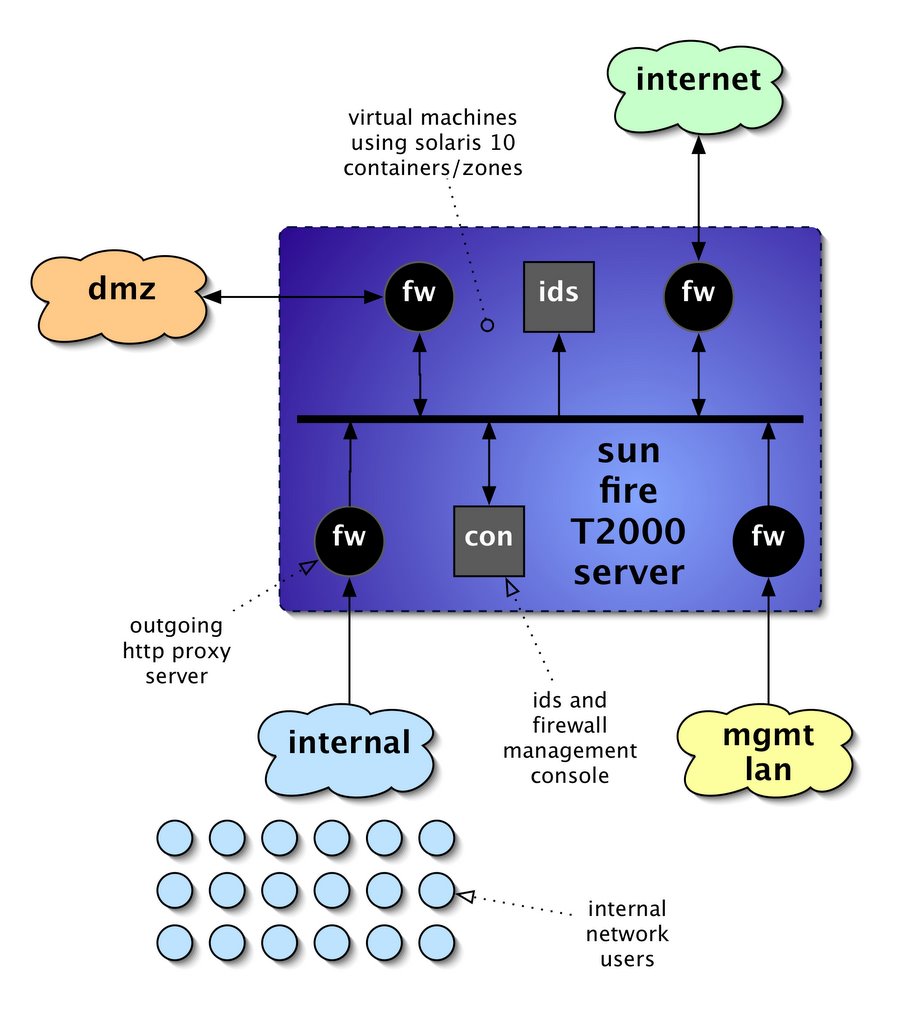
one of the ideas i have for testing the capabilities of the sun fire t2000 server is to build a network security appliance. this would involve utilisation of the zones feature in solaris 10. this allows full virtualisation of sevrers on one machine, along with allocation of resources, such as network ports or physical cpus, to that instance. each instance is a separate, full version of the solaris operating environment, and is indistinguishable from a complete physical machine to any processes running in it. this makes it ideal for separating security critical functions like firewalls and intrusion detection systems from each other, while still allowing them to run on one server.


network security appliance diagram

in the above diagram you can see that i intend to virtualise six instances, four firewalls, one ids sensor and a management system. the t2000 has four gigabit ethernet ports, which would be assigned to each of the four networks, while inter-machine communication and intrusion detection would all be done using the virtual internal network. it will be simple to allocate at least one cpu to each machine, and the resource pooling commands available will allow some of the virtual machines to have extra cpus allocated, perhaps the internet-facing firewall and the ids sensor. the sun bigadmin site has some useful resources on zones, including the original usenix paper describing the implementation.

the software to be installed will all be open-source packages, most of which are de-facto industry standards. i will use squid as the outgoing web proxy, snort as the network ids and use native solaris networking for the firewall rules. i will need to determine a suitable console to administer the firewalls, but sguil will be used for ids command and control.

a useful test would be to determine the line-speed that the firewalls and the ids are capable of handling without dropping any packets, and the number of simultaneous outgoing connections that the proxy will allow, while the dmz also has web traffic being sent to it from the internet. i believe that the t2000 should be a good platform for this kind of appliance, due to the one-box approach that can be taken, while not having to compromise on cpu power available. i intend to set this environment up over the next week and produce some performace figures to try and validate this claim.

15/03/2006

hardening solaris ten

my first job on booting solaris 10 on hexagon, my sun fire t2000 system, was to harden the operating system. i want to make sure that the system is not going to be offering extraneous services to passers-by on the internet (even though everything but ssh will be firewalled off.) this will have the added bonus of stopping cpu being used unnecessarily. an initial portscan using the ubiquitous nmap utility revealed the following open ports:

robot$ nmap -p1-65535 -A hexagon

Interesting ports on hexagon (10.10.10.6):
(The 65514 ports scanned but not shown below are in state: closed)
PORT STATE SERVICE VERSION
21/tcp open ftp Solaris ftpd
22/tcp open ssh SunSSH 1.1 (protocol 2.0)
23/tcp open telnet
25/tcp open smtp Sendmail 8.13.4+Sun/8.13.3
111/tcp open rpcbind 2-4 (rpc #100000)
513/tcp open login Berkeley remote login service
514/tcp open tcpwrapped
587/tcp open smtp Sendmail 8.13.4+Sun/8.13.3
898/tcp open http Solaris management console server
4045/tcp open nlockmgr 1-4 (rpc #100021)
5987/tcp open unknown
5988/tcp open unknown
7100/tcp open font-service Sun Solaris fs.auto
9010/tcp open tcpwrapped
22273/tcp open wnn6?
32771/tcp open status 1 (rpc #100024)
32772/tcp open fmproduct 1 (rpc #1073741824)
32773/tcp open rusersd 2-3 (rpc #100002)
32774/tcp open ttdbserverd 1 (rpc #100083)
32777/tcp open sometimes-rpc17?
32778/tcp open dmispd 1 (rpc #300598)
32779/tcp open snmpXdmid 1 (rpc #100249)
32795/tcp open unknown
Service Info: OSs: Solaris, Unix, SunOS

Nmap finished: 1 IP address (1 host up) scanned in 1778.040 seconds

as you can see, there's a lot of unwanted access provided there. at least ssh is there by default, but we also have telnet and rlogin, the X11 font server, as well as all those RPC services... solaris 10 manages services with the svcxsxxx utilities, and i will use them to turn off telnetd and rlogin, as follows:

root@hexagon# svcadm disable svc:/network/telnet
root@hexagon# svcadm disable svc:/network/login:rlogin
root@hexagon# svcadm disable svc:/application/x11/xfs
root@hexagon# svcadm disable svc:/network/ftp:default
root@hexagon# svcadm disable svc:/network/rpc/rusers
root@hexagon# svcadm disable svc:/network/rpc/rstat
root@hexagon# svcadm disable svc:/network/shell:default

and we can also get rid of the packages that provide telnetd itself, since it is inherently insecure, and there is always potential access via telnet to the console over the ALOM network port. first, check what packages need removed, then remove them with the pkgrm utility:

root@hexagon# pkginfo | grep -i telnet
SUNWtnetr Telnet Server Daemon (Root)
SUNWtnetc Telnet Command (client)
SUNWtnetd Telnet Server Daemon (Usr)
root@hexagon# pkgrm SUNWtnetr SUNWtnetd

hopefully, this has given you an idea of how to do all this manually. i also downloaded the sun solaris security toolkit which has a lot of useful scripts to automate the hardening process. the file you require is SUNWjass-4.2.0.pkg.tar.Z and is only 600KB. you need to be registered with sun to download anything, but this is useful anyway, since you need an id to get the latest security patches, and also to access the sun update connection site.

root@hexagon# uncompress SUNWjass-4.2.0.pkg.tar.Z
root@hexagon# tar xf SUNWjass-4.2.0.pkg.tar
root@hexagon# pkgadd -d . SUNWjass

Processing package instance <SUNWjass> from </root/install>

Solaris Security Toolkit 4.2.0(Solaris) 4.2.0
Copyright 2005 Sun Microsystems, Inc. All rights reserved.
Use is subject to license terms.
Using </opt> as the package base directory.
## Processing package information.
## Processing system information.
## Verifying package dependencies.
## Verifying disk space requirements.
## Checking for conflicts with packages already installed.
## Checking for setuid/setgid programs.

Installing Solaris Security Toolkit 4.2.0 as <SUNWjass>

## Installing part 1 of 1.
/opt/SUNWjass/Audit/disable-IIim.aud
/opt/SUNWjass/Audit/disable-ab2.aud
...etc...
/opt/SUNWjass/rules.SAMPLE
/opt/SUNWjass/sysidcfg <symbolic link>
[ verifying class <none> ]

Installation of <SUNWjass> was successful.

you'll notice that the package was loaded from /root/install. this is because i modify the root user to have a different home directory. often / is a shared home directory for other system accounts and daemon user ids, and it's never a good ide to have the root .profile and other dot-files there. moving home is relatively easy though:

root@hexagon# usermod -d /root root
root@hexagon# mkdir /root
root@hexagon# chmod 700 /root
root@hexagon# mv /.[a-zA-Z0-9]* /root/

and even all the existing dot-files get copied across. the jaas security toolkit has a large number of configurable options, which are documented in the reference manual. the security blueprints collection is also a good place to look for information. to secure your solaris system with the jaas tool, execute the hardening driver using the following command:

root@hexagon# /opt/SUNWjass/bin/jass-execute -d hardening.driver |
tee jaas-hardening.log


which will lock down your system, and place a log of all output into jaas-hardening.txt. once this has completed, reboot to implement the changes. when you next login you will see that a security warning has been added:

|-----------------------------------------------------------------|
| This system is for the use of authorized users only. |
| Individuals using this computer system without authority, or in |
| excess of their authority, are subject to having all of their |
| activities on this system monitored and recorded by system |
| personnel. |
| |
| In the course of monitoring individuals improperly using this |
| system, or in the course of system maintenance, the activities |
| of authorized users may also be monitored. |
| |
| Anyone using this system expressly consents to such monitoring |
| and is advised that if such monitoring reveals possible |
| evidence of criminal activity, system personnel may provide the |
| evidence of such monitoring to law enforcement officials. |
|-----------------------------------------------------------------|

which should be modified to comply with local legal requirements. also, the passwords for any existing users will have been expired, and a much more stringent policy is now in place. if an nmap scan is run against the system now, you will see that most ports are closed, except ssh and one other that will be investigated later:

$ nmap -p 1-65535 -A hexagon | tee entries/hexagon.ports.03.txt

Interesting ports on hexagon (10.10.10.6):
(The 65533 ports scanned but not shown below are in state: closed)
PORT STATE SERVICE VERSION
22/tcp open ssh SunSSH 1.1 (protocol 2.0)
22273/tcp open wnn6?

Nmap finished: 1 IP address (1 host up) scanned in 1814.355 seconds

next, i installed some useful extra utilities, from the sun freeware site. this has lots of GNU software compiled for SPARC on solaris 10, although you may want to check out sun's offerings from the solaris 10 companion dvd. sudo is a good replavement for the standard su program, curl makes retrieval of files from the internet simple and lsof lists all files that a process has . once you have downloaded them, installstallation follows the same basic pattern. this is how i installed the SMClsof and SFWsudo packages:

root@hexagon# gunzip lsof-4.76-sol10-sparc-local.gz
root@hexagon# ln -s /usr/sfw /usr/local
root@hexagon# pkgadd -d ./lsof-4.76-sol10-sparc-local

The following packages are available:
1 SMClsof lsof
(sparc) 4.76

Select package(s) you wish to process (or 'all' to process
all packages). (default: all) [?,??,q]: all

Processing package instance <SMClsof>
from </root/install/lsof-4.76-sol10-sparc-local>

lsof(sparc) 4.76
Vic Abell
Using </usr/local> as the package base directory.
## Processing package information.
## Processing system information.
2 package pathnames are already properly installed.
## Verifying disk space requirements.
## Checking for conflicts with packages already installed.

The following files are already installed on the system and are being
used by another package:
* /usr/local/doc
* /usr/local/man

* - conflict with a file which does not belong to any package.

Do you want to install these conflicting files [y,n,?,q] n

Do you want to continue with the installation of <SMClsof> [y,n,?] y
## Checking for setuid/setgid programs.

The following files are being installed with setuid and/or setgid
permissions:
/usr/local/bin/lsof <setgid bin>

Do you want to install these as setuid/setgid files [y,n,?,q] y
## Processing package information.
## Processing system information.

Installing lsof as <SMClsof>

## Installing part 1 of 1.
/usr/local/bin/lsof
/usr/local/doc &glt;conflicting pathname not installed>
/usr/local/doc/lsof/00.README.FIRST
/usr/local/doc/lsof/00CREDITS
/usr/local/doc/lsof/00DCACHE
/usr/local/doc/lsof/00DIALECTS
/usr/local/doc/lsof/00DIST
/usr/local/doc/lsof/00FAQ
/usr/local/doc/lsof/00LSOF-L
/usr/local/doc/lsof/00MANIFEST
/usr/local/doc/lsof/00PORTING
/usr/local/doc/lsof/00QUICKSTART
/usr/local/doc/lsof/00README
/usr/local/doc/lsof/00TEST
/usr/local/doc/lsof/00XCONFIG
/usr/local/doc/lsof/lsof.man
/usr/local/man <conflicting pathname not installed>
/usr/local/man/man8/lsof.8
[ verifying class <none> ]

Installation of <SMClsof> was successful
root@hexagon# bzip2 -d SFWsudo.bz2
root@hexagon# ln -s /usr/sfw /opt/sfw
root@hexagon# pkgadd -d ./SFWsudo

The following packages are available:
1 SFWsudo Sudo - superuser do
(sparc) 1.6.8.5,REV=2005.01.05.17.49

Select package(s) you wish to process (or 'all' to process
all packages). (default: all) [?,??,q]: all

Processing package instance <SFWsudo> from </root/install/SFWsudo>

Sudo - superuser do(sparc) 1.6.8.5,REV=2005.01.05.17.49

...and so on...

Installation of <SFWsudo> was successful.
root@hexagon# chmod u+s /usr/sfw/bin/sudo

important - notice that the sudo executable was not setuid root, and we had to change this after installation, to make it work! after this, the installs for any other packages will be very similar - use the above processes as a guide, just remember to check where in the filesystem things get installed, and either create symlinks or allow it as required. once sudo has been installed, you need to authorise users to have access to the root user. use the visudo command as root, and setup the sudoers file. i added the following line, which gives everyone in the sysadmin group root access:

%sysadmin       ALL=(ALL)       ALL


since we have lsof installed now, we can check what was holding the other port (22273/tcp) open. in the nmap output it is listed as wnn6? but we can check what process is using it with lsof and find as follows:

root@hexagon# lsof | grep -i wnn
jserver_m 741 root 3u IPv4 0x600036e0100 0t0 TCP *:wnn6 (BOUND)
jserver_m 741 root 4u IPv6 0x6000377f940 0t0 TCP *:wnn6 (LISTEN)
root@hexagon# find / -name "jserver_m" -print
/usr/lib/locale/ja/wnn/jserver_m

and we can see that it is a program called jserver_m that seems to have something to do with the japanese locale input method. i don't live in japan, or speak japanese, so this can be safely turned off. checking with svcs shows that it is started by init and can be disabled as follows:

root@hexagon# svcs | grep -i wnn
legacy_run 20:50:28 lrc:/etc/rc2_d/S94Wnn6
root@hexagon# /etc/init.d/Wnn6 stop
root@hexagon# mv /etc/rc2.d/S94Wnn6 /etc/rc2.d/_S94Wnn6.DISABLED

hopefully this has given you an idea of how best to approach hardening a solaris 10 system. the one thing not covered here is patching, which i will describe in another post. depending on how tightly you want things locked down initially, you can either manually turn off certain services or you can use sun's provided toolkit, and edit the default settings. this gives you a lot of flexibility, but i now have a system i feel safe about connecting to my router and assigning an IP address...